Frequently asked Questions (FAQ)
- How can I find a specific guidebook?
- INSIGHT GUIDES BOOKS AND EBOOKS
- Which ebook formats are available?
- How can I download my ebook after purchase?
- How to Download and Read an eBook on Your Android Phone (ePub Format)
- How to Download and Read an eBook on Your iPhone/iPad (ePub Format)
- How to Add Your eBook to Kindle Using Your PC or Mac
- How can I buy a printed book or ebook in the Insight Guides shop?
- Which payment options can I use in the Insight Guides Shop?
- To which countries do you ship printed books?
- How long will it take to receive my order from the Insight Guides Shop?
- How much does it cost to ship my order from the Insight Guides Shop?
- USA
- Where can I find my orders in the Insight Guides shop?
- How can I return items purchased from the Insight Guides Shop?
- How can I contact Insight Guides about a shop order?
- General Insight Guides shop and guidebooks information
- Free ebook with purchase of a printed book
- I want to collaborate with Insight Guides
- Working with Insight Guides
INSIGHT GUIDES BOOKS AND EBOOKS
How can I find a specific guidebook?
If you know the title of a book you are looking for, the best way to find it is to type the title in the search bar at the top of the online shop webpage.
You can also use filters at the top of the product listing page to find your book by country, series and format (printed or ebook).
Which ebook formats are available?
Our ebooks are available in epub format, the most widely supported eBook. Epub files can be read on a variety of devices, including computers, smartphones, tablets, and most eReaders including Kindle devices. To read an ePub format ebook, you need to install an ePub reader on your device.
Here are some options for epub readers for different devices:
- Android: Ebook Reader (https://play.google.com/store/apps/details?id=com.ebooks.ebookreader)
- iPad/iPhone: Apple books (https://apps.apple.com/gb/app/apple-books/id364709193)
- PC/Mac: Adobe Digital Editions (https://www.adobe.com/solutions/ebook/digital-editions.html)
How can I download my ebook after purchase?
After you purchased an ebook, you will receive an order confirmation email and a separate email with a download link for your ebook. This link is valid for 3 days.
After this period, you can log in to your account and download the ebook (not a complementary free-ebook) from your order list in the section "My Shop Orders".
To download complementary free ebook, you got with printed book: go to shop.insightguides.com/free-ebook and fill the form. Once you have entered the unique code, you will automatically see the corresponding ebook. Follow the steps shown on the screen. After that you will receive an email with free ebook version and you will be able to access your ebook files at all times by logging into your account on www.insightguides.com and visiting the Shop Orders tab.
Please note: The ebooks available to purchase from Insight Guides online bookshop are typically anywhere between 30MB and 120MB. We recommend that you download your ebook over WiFi or check your data allowance with your mobile network provider to ensure it is sufficient.
How to Download and Read an eBook on Your Android Phone (ePub Format)
- Connect to Wi-Fi
Before you start, make sure your phone is connected to Wi-Fi to avoid using up your mobile data while downloading the eBook. - Open the Email
Go to your email app on your phone and open the email that contains the eBook link. - Click the Link
Tap on the link in the email. This will open a web page in your internet browser. - Download the eBook
On the web page, look for the Download button and tap it.
The eBook file (in ePub format) will start downloading. - Check if You Have Google Play Books on Your Phone
Most Android phones come with Google Play Books pre-installed. Look for the app on your phone.
If it’s not installed, go to the Google Play Store and download it for free from there. - Open Google Play Books
Open the Google Play Books app on your phone.
Tap the Library tab. The app should automatically detect your downloaded ePub file and add it to your library. - Add the eBook Manually (If Needed)
If the eBook doesn’t appear in your library, tap the Menu or Upload button in Google Play Books and select Upload files.
Navigate to your phone's Downloads folder and select the ePub file. - Start Reading
Once the eBook appears in your library, simply tap on it to start reading!
How to Download and Read an eBook on Your iPhone/iPad (ePub Format)
- Connect to Wi-Fi
Before you start, make sure your iPhone is connected to Wi-Fi to avoid using up your mobile data while downloading the eBook. - Open the Email
Go to your email app on your iPhone and open the email that contains the eBook link. - Click the Link
Tap on the link in the email. This will open a web page in your internet browser. - Download the eBook
On the web page, look for the Download button and tap it.
The eBook file (in ePub format) will start downloading and will be saved in your Files app, under the Downloads folder. - Open the Apple Books App
Go to your iPhone’s Apple Books app.
Tap on the Library tab at the bottom of the screen. - Access Downloads in Apple Books
In the Library, look for the Collections menu or section (it might be labelled differently depending on your app version).
Choose Downloads from the list of available options.
The eBook file you downloaded should appear here. - Start Reading
Tap on the eBook in the Downloads section to open it. You can now start reading!
How to Add Your eBook to Kindle Using Your PC or Mac
- Download the eBook
Open the email with the eBook link on your PC or Mac.
Click the link to download the ePub file (it’s usually saved in your Downloads folder). - Open Amazon's "Send to Kindle" Page
Go to Amazon’s Send to Kindle website . - Log in to Your Amazon Account
Use your Amazon account credentials to log in. - Upload the ePub File
Click Upload Files and select the downloaded ePub file from your PC or Mac.
Confirm the upload by clicking Send. - Sync Your Kindle
Open your Kindle or Kindle app and ensure it’s connected to Wi-Fi.
Tap Sync or Check for New Items to update your library. - Start Reading
Your eBook should now appear in your Kindle library, ready to read!
How can I buy a printed book or ebook in the Insight Guides shop?
Here is a quick step-by-step guide to show you how to place an order via our online shop:
- Choose your desired item on the listing page or detail page and click "Add to cart" or "Buy now".
- From your cart Cart or after you click ‘Buy Now’ you can proceed to the checkout.
- Log in or create an account, then enter your delivery and billing address, select your delivery method and payment method and review your order.
- After payment, you will receive an order confirmation email, and if you bought an ebook a download email, or if you bought a printed book a delivery notification after your order is dispatched.
Which payment options can I use in the Insight Guides Shop?
You can pay with credit card: Visa, MasterCard, American Express, and via PayPal.
To which countries do you ship printed books?
Currently, we ship printed books to delivery addresses in the following locations
- United Kingdom and Northern Ireland
- USA (except Pennsylvania, Indiana, Mississippi, Tennessee and Oregon)
We are working to add more countries to ship printed books.
If you would like to order a book outside these locations: most of our guidebooks are available as ebooks, which we deliver worldwide by email.
How long will it take to receive my order from the Insight Guides Shop?
If you’ve ordered an ebook, it will be delivered to you via email immediately after your purchase.
For printed book orders, we offer the following shipping options:
- United Kingdom: DPD delivery within 1-3 business days.
- United States (excluding Pennsylvania, Indiana, Mississippi, Tennessee, and Oregon): select between standard shipping (2-8 business days) or priority shipping (1-3 business days).
Please be aware that the delivery times are based on when your item was dispatched and not when you ordered your item.
Currently, we do not provide a tracking number for your order.
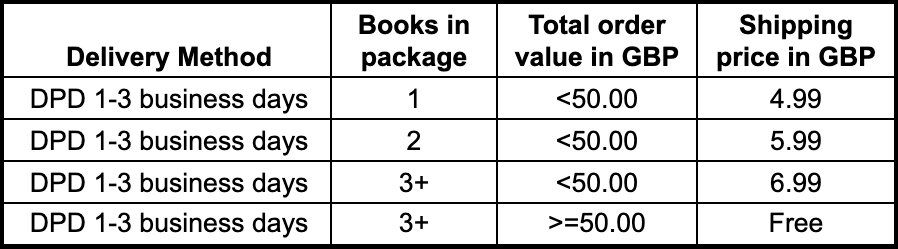
How much does it cost to ship my order from the Insight Guides Shop?
If you ordered an ebook, it will be delivered by email without any cost.
For printed books please see in the tables below which shipping costs apply to your order. Orders with both more than 3 printed books and an order value above 50 GBP or USD receive free shipping.
United Kingdom and Northern Ireland
USA
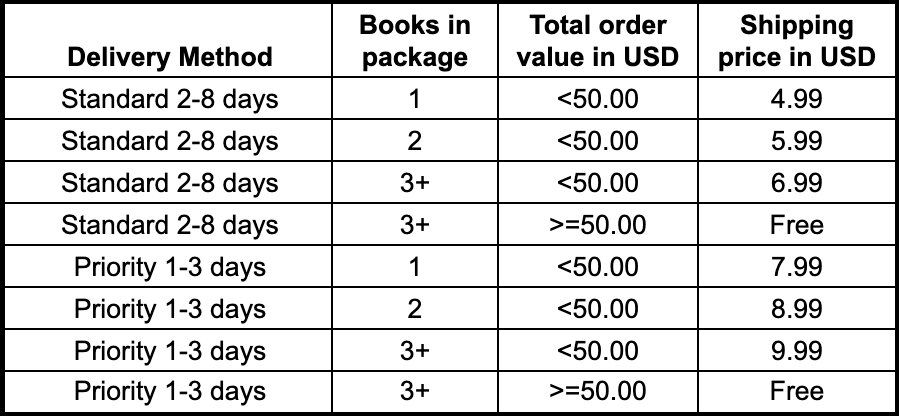
USA (except Pennsylvania, Indiana, Mississippi, Tennessee and Oregon)
Where can I find my orders in the Insight Guides shop?
The first option is the section "My Shop Orders" in your account. When you place an order in the Insight Guides online shop, you create an account. Here you can access your order information such as order number, items ordered, see your delivery status and download your ebooks.
A second option is your order confirmation email. After your purchase you will receive an order confirmation email with your order number, your order details and a link to your order in your account. This email also includes download links for ebooks in case you bought any.
How can I return items purchased from the Insight Guides Shop?
1. Return of printed books
A. Damaged items
In case you received a defective or damaged item(s), please do the following so we can help you quickly
- take pictures of the damage / the damaged parcel
- send an email to our support team at "mail@roughguides.com" with the subject "Return damaged book"
- include your order number and invoice number
- if you live in the UK, also include the despatch note number from the document inside your parcel
- please also state if you would like to receive a replacement or a refund
B. Changing your mind
You have the right to return your purchased item(s) within the period of 14 days from the date you received your product, during which time you can change your mind and receive a refund. Please note that this does not apply to digital products.
To process your return please contact us at mail@roughguides.com within the 14-day period and provide your order details, specifically your order number. Please be aware, if you do want to return an item, you will need to cover the cost of return postage. Your refund will be processed by the same method as your original payment after receiving your returned items.
We cannot refund any credit card fees or import duties.
As we cannot process your refund if we haven’t received your item(s), please keep the proof of your postage in the unlikely event any problems arise during the returns process.
2. Return of ebooks
You can return your ebook ONLY if it’s defective.
First, check if your ebook is defective.
- Please open the file in an ebook reader that supports the epub format
- Did your ebook file download completely? Do you get a notification the file is incomplete or damaged? If yes, please delete it and download the file again from your account
For other issues such as your ebook
- does not show the content correctly
- is the wrong title, series, edition
please send an email to our team at "mail@roughguides.com" with the subject "Ebook issues". Include a screenshot and your order number to help us understand what is wrong. We will be in touch for a refund or replacement.
How can I contact Insight Guides about a shop order?
You can contact our shop team at "mail@roughguides.com".
To help our team reply faster, please copy and use one of the following email subject lines:
- "Book shop: orders, shipping, returns"
- "Website: general usage and technical problems"
- "Guide books: corrections and other questions"
- "Tailor-made travel"
Also please provide as much information as possible about your issue, including your full name, order items and order number. The team will get back to you as soon as possible.
General Insight Guides shop and guidebooks information
How often are the Insight Guides’ new editions released?
In the wake of Covid-19 and its impact on the travel industry as a whole, we remain flexible with our upcoming publishing schedule. We can confirm upcoming editions for the next six months, so feel free to reach out to mail@roughguides.com with the subject "New releases" to hear more.
I want my business to be listed in your guidebook or on your website
All listings in our guidebooks, and on the website, are compiled by the personal recommendations of the authors. We cannot guarantee your business will be listed. In case your business is listed we will not charge for the inclusion in our travel guides.
You are welcome to send your details to mail@roughguides.com with the subject "Insight Guides listing" and we will share these with the authors who will be in touch directly in case they are interested.
I found an error in a book / your online content
Would you like to report an error in one of our books or in our web content? Awesome! We work hard to ensure our guides are accurate, and appreciate you helping us with fixing the errors we missed.
To report an error inside a printed guidebook, please send an email to our support team at "mail@roughguides.com" with the subject "Book correction". In your email, please include the book title, edition or ISBN and page number, plus your correction.
To report an error in our content, please send an email to our support team at "mail@roughguides.com" with the Subject "Correction for online content". Please include the URL and a screenshot of the error, plus a description how to fix it.
Free ebook with purchase of a printed book
We offer a free complimentary ebook with the purchase of our print copies since start of 2019. Every print copy includes a unique download code that can be entered here.
To download complementary free ebook, you got with printed book: go to shop.insightguides.com/free-ebook and fill the form. Once you have entered the unique code, you will automatically see the corresponding ebook. Follow the steps shown on the screen. After that you will receive an email with free ebook version and you will be able to access your ebook files at all times by logging into your account on www.insightguides.com and visiting the Shop Orders tab. If you have any trouble accessing your ebook, please email us at mail@roughguides.com with the subject "Free ebook issues".
I want to collaborate with Insight Guides
If you are looking for a commercial collaboration such as bespoke publishing and content creation, brand partnerships, sponsored content, please visit our commercial trade website for case studies, collaboration opportunities and offers.
Working with Insight Guides
We’re delighted to hear that! Follow us on LinkedIn for the latest job offers and company updates.